Understand your spending — privately
Spend Tracker is a simple, elegant way to manage your money. Log income and expenses in seconds, organize everything by category, set budgets, and see exactly where your money goes — without your financial data ever leaving your device.
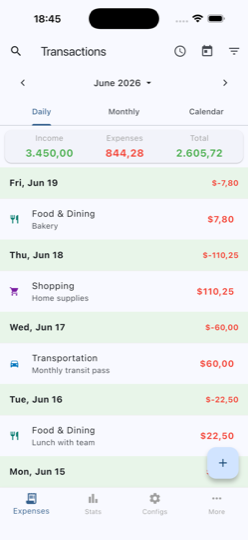 Daily transactions
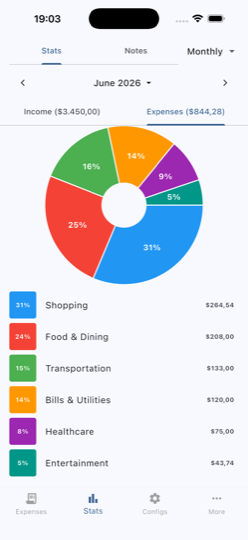 Spending insights
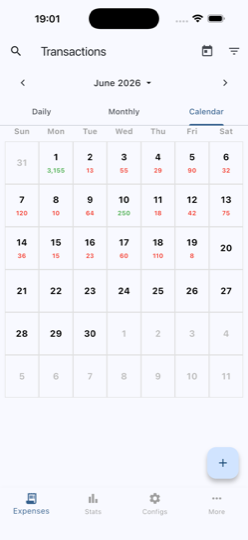 Calendar view
Fast entry
Add a transaction in seconds with a built-in calculator keypad.
Private by design
All financial data is stored locally on your device — never uploaded to a server.
Custom categories
Organize spending with your own categories, icons, colors, and subcategories.
Multiple accounts
Track cards, cash, and bank accounts, each with its own running balance.
Budgets
Set budgets by category to keep your spending on target.
Recurring transactions
Automate salaries, rent, and subscriptions on a daily, weekly, monthly, or yearly schedule.
Scan receipts
Capture receipts and extract the details on-device with built-in text recognition.
Rich statistics
Visualize spending with pie and bar charts across any time period.
Daily, monthly & calendar
View your transactions the way that suits you, with quick period navigation.
Search & filter
Instantly find transactions by amount, note, category, account, or date.
Backup & export
Back up your full database, or export transactions to CSV and Excel anytime.
Multi-currency
Choose your currency symbol, position, and decimals with flexible formatting.
Your money data stays on your phone
Transactions, amounts, categories, and receipts never leave your device. Only anonymous crash & performance diagnostics are collected to keep the app stable.
How can we help?
Browse the answers below. If you still need a hand, get in touch and we’ll reply as soon as we can.
Contact Support
Questions, bugs, or feedback — we’d love to hear from you.
Email Support or write to [email protected]🚀 Getting Started
How do I add a transaction?
How do I create categories?
How do I add accounts?
🧾 Managing Transactions
How do I edit a transaction?
How do I delete a transaction?
How do I group transactions?
How does note autocomplete work?
How do I attach receipts?
What are recurring transactions?
🗂️ Categories & Organization
What are subcategories?
How do I reorder categories?
How do I sort categories alphabetically?
How do I merge categories?
Can I use multiple categories for one transaction?
🔍 Filtering & Search
How do I filter transactions?
What is the “All time” view?
How do I search for transactions?
💾 Backup & Data
How do I backup my data?
How do I restore from backup?
How do I export my data?
Is my data safe?
⚙️ Settings & Customization
How do I change the currency?
Can I set a default account?
🛠️ Troubleshooting
My transactions disappeared!
Filters stopped working after restoring backup
I can’t see my backup file when restoring
Categories are not showing in order
I only see a few transactions when filtering
💡 Tips & Best Practices
Organize with subcategories
Clean up duplicate categories
Use filters for insights
Regular backups
Add notes and receipts
Use recurring transactions
Privacy Policy
🔒 Your financial data never leaves your deviceLast updated: June 2026
Data Storage
Spend Tracker stores all your financial data locally on your device. Your transactions, accounts, categories, notes, and attachments remain private and under your complete control. This financial data is NEVER transmitted to any external servers.
However, for app improvement purposes, we collect limited technical information (errors and performance metrics) as described in the “Error Reporting and Performance Monitoring” section below.
Your Financial Data Stays Private
We do not collect, transmit, or have access to your personal financial information:
- Transaction amounts and descriptions
- Account balances and names
- Category names and budgets
- Notes and memos
- Receipt photos and attachments
- Any personally identifiable information
All this data is stored exclusively on your device and never leaves it.
Data Security
Your data is stored in a local SQLite database on your device. The security of this data depends on your device’s security measures, such as device lock, encryption, and access controls. We recommend using device-level security features to protect your data.
Backup and Export
You have full control over your data through our backup and export features:
- Backup: Create a complete backup of your database that you can store securely
- Export: Export your transactions to CSV or Excel format
- Restore: Restore your data from a previously created backup
When you share backups or exports, you are responsible for the security of these files.
Attachments and Photos
Receipt photos and file attachments you add to transactions are stored locally on your device. These files are not transmitted or uploaded to any external servers. They are included in database backups if you choose to create one.
Error Reporting and Performance Monitoring
To improve app stability and performance, Spend Tracker collects limited technical information when errors occur:
- Crash reports: stack traces and error messages when the app crashes
- Performance data: database query execution times and app performance metrics
- Device information: operating system version, app version, and device model
- Configuration data: settings to control monitoring features
This data is transmitted securely over HTTPS to our monitoring infrastructure and used solely for debugging and improving the app.
What we do NOT collect:
- Your financial data (transactions, amounts, categories)
- Personal identifiable information (name, email, phone)
- Location data
- Content of your notes or descriptions
- Photos or attachments
Third-Party Services
Spend Tracker uses monitoring services for error tracking and performance analysis. We do not use any third-party analytics, advertising, or data collection services beyond what is necessary for app stability and improvement.
The app can operate offline, but an internet connection is required to send error reports and fetch configuration updates.
Data Retention and Resilience
Error and performance data collected for monitoring purposes:
- Is retained for up to 90 days for debugging purposes
- Is automatically purged after this period
- Can be remotely disabled if needed
- Does not impact app functionality if monitoring services are unavailable
The app is designed to work perfectly even when offline or if monitoring services are unavailable. Your financial data remains accessible and fully functional at all times.
Children’s Privacy
Spend Tracker does not knowingly collect any information from anyone, including children under the age of 13. Since all data is stored locally, there is no data collection mechanism in place.
Changes to This Policy
We may update this Privacy Policy from time to time. Any changes will be reflected in the app with an updated “Last updated” date. We encourage you to review this policy periodically.
Data Controller Information
For the purpose of data protection law, the data controller responsible for processing error and performance data is the developer of Spend Tracker.
Your financial data (transactions, accounts, etc.) is stored exclusively on your device and is not processed by us or any third party.
Legal Basis for Processing
We process error and performance data based on our legitimate interest (Article 6(1)(f) GDPR) in:
- Maintaining and improving app stability
- Identifying and fixing bugs
- Optimizing performance
- Ensuring the app functions correctly for all users
This processing is necessary to provide you with a stable, functional application. The data collected is minimal, technical in nature, and does not include any personal financial information.
You have the right to object to this processing at any time by disabling error reporting in the app settings.
Your Rights Under GDPR
If you are located in the European Economic Area, you have the following rights:
Regarding your financial data (stored locally):
- Access: view all your data at any time within the app
- Rectification: edit or modify any transaction, category, or account
- Erasure: delete individual records or uninstall the app to remove all data
- Data Portability: export your data in CSV or Excel format
Regarding error and performance data:
- Object: disable error reporting in app settings at any time
- Access: request a copy of error data we have collected
- Erasure: request deletion of your error data
- Rectification: request correction of inaccurate data
To exercise these rights regarding error data, please contact us. You also have the right to lodge a complaint with your local data protection authority.
International Data Transfers
Error and performance data may be transferred to and processed in countries outside your country of residence. When data is transferred internationally, we ensure appropriate safeguards are in place to protect your data in accordance with applicable data protection laws.
Your financial data is never transferred as it remains exclusively on your device.
Opt-Out of Error Reporting
You can disable error and performance monitoring at any time through the app settings. When disabled, no technical data will be collected or transmitted. The app will continue to function normally with all features available.
To opt out, go to Settings > Privacy > Error Reporting.
Contact
If you have any questions or concerns about this Privacy Policy, or wish to exercise your data protection rights, please email [email protected].